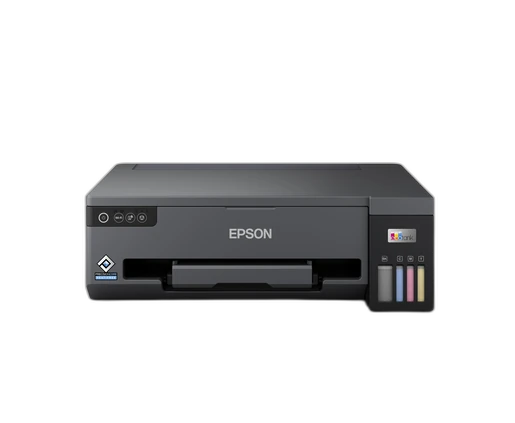

Choose ET-3950 if you need:
- Automatic Duplex Printing: Yes
- Automatic Document Feeder: Yes
printpedia
Side-by-side specification comparison of two reference models
A full side-by-side comparison of reference models L11050 and ET-3950 within the same category.
Side-by-side specification comparison of two reference models
| Specification | L11050 | ET-3950 |
|---|---|---|
| Price | Not for sale | Not for sale |
| General | ||
| Brand | Epson | Epson |
| Product Family | EcoTank Business+ | EcoTank |
| Canonical Model | L11050 | ET-3950 |
| Launch Year | 2023 year | 2025 year |
| Printer Type | Colour ink-tank printer | Colour multifunction ink tank printer |
| Functions | Print, Scan, Copy | |
| Colour Printing | Yes | Yes |
| Form Factor | Desktop | Desktop |
| Target Use | Office / Small business | Home office |
| Merged Regional Aliases | No regional aliases merged | ET-3950; ET-3956 |
| Print Technology | PrecisionCore Heat-Free inkjet | Inkjet (refillable ink tank) |
| Machine Life or Duty Cycle | 50000 pages / 2 years warranty limit page | 100000 page |
| Print Head | PrecisionCore | PrecisionCore printhead |
| Nozzle Configuration | 400 black; 128 per colour | 400 black nozzles; 128 nozzles per colour |
| Ink Colour Count | 4 colour | 4 colour |
| Ink Technology | Dye | Pigment black and dye colour inks |
| Maximum Print Resolution | 4800 x 1200 dpi | 4800 x 1200 dpi |
| ISO Black Speed | 15 ipm | 18 ipm |
| ISO Colour Speed | 8 ipm | 9 ipm |
| Draft Black Speed | 30 ppm | — |
| Draft Colour Speed | 20 ppm | — |
| First Page Out Colour | 12 sec | 13.5 sec |
| Borderless Printing | Yes | Yes |
| Maximum Borderless Size | A3+ | A4 |
| Minimum Droplet Size | 3.3 pl | 3.3 pl |
| Print Performance | ||
| First Page Out Black | 8 sec | 8.5 sec |
| Paper & Printing | ||
| Automatic Duplex Printing | — | Yes |
| Maximum Paper Size | A3+ | A4 |
| Standard Input Capacity | 100 sheet | 250 sheet |
| Multipurpose Tray Capacity | 0 sheet | 0 sheet |
| Output Capacity | 30 sheet | 30 sheet |
| Scanning | ||
| Scanner Type | — | Contact Image Sensor (CIS) |
| Optical Scan Resolution | — | 1200 dpi |
| ADF Capacity | — | 30 sheet |
| Scan Copy Fax | ||
| Maximum Scan Size | — | A4 |
| Mono Scan Speed | — | 9 (flatbed) sec/page |
| Colour Scan Speed | — | 21 (flatbed) sec/page |
| Automatic Document Feeder | — | Yes |
| Automatic Duplex Scanning | — | Yes |
| Copy Function | — | Yes |
| Paper | ||
| Rear Feed Capacity | 100 sheet | 0 sheet |
| Front Cassette Count | 0 tray | 1 tray |
| Media Types | Plain, photo, envelopes | Plain paper; Envelopes; Photo paper |
| Media Weight Range | 64-300 g/m2 | 64-300 g/m2 |
| Automatic Opening Output Tray | — | Yes |
| Connectivity | ||
| USB | Yes | Yes |
| Ethernet | — | Yes |
| Wi-Fi | Yes | Yes |
| Wi-Fi Direct | Yes | Yes |
| Apple AirPrint | — | Yes |
| Mopria | — | Yes |
| Connectivity Software | ||
| Mobile App | Epson Smart Panel | Epson Smart Panel |
| Operating Systems | Windows; macOS | Windows; macOS; Windows Server |
| Email or Cloud Print | Yes | Yes |
| Ink Operations | ||
| Ink Bottle Series | 003 | 102 |
| Replacement Black Yield | 4500 page | 7500 page |
| Replacement Colour Yield | 7000 page | 6000 page |
| Dimensions W x D x H | 498 x 358 x 165 mm | 375 x 347 x 240 mm |
| Operating Power | 16 W | 15 W |
| Display | — | Colour, 6,1 cm |
| User-replaceable Maintenance Box | Yes | Yes |
| Included Black Yield | 6400 page | 15100 page |
| Included Colour Yield | 5600 page | 5500 page |
| Dimensions & Weight | ||
| Weight | 6.4 kg | 7.2 kg |
L11050 and ET-3950 share specifications such as Wi-Fi (Yes), Brand (Epson), Colour Printing (Yes), Form Factor (Desktop).
The main differences: Functions (L11050: Print, ET-3950: Print, Scan, Copy); ISO Black Speed (L11050: 15 ipm, ET-3950: 18 ipm); ISO Colour Speed (L11050: 8 ipm, ET-3950: 9 ipm); Automatic Duplex Printing (L11050: —, ET-3950: Yes).
L11050 may suit users who need its differing values, while ET-3950 benefits those who need its paired strengths. Review the specs table above before deciding.