
Choose MFC-7840N if you need:
- Fax Resolution: 203 x 392 dpi
- Higher Maximum Custom Media Length: 406.4 mm vs 355.6 mm
- Higher Maximum Memory: 32 MB
printpedia
Side-by-side specification comparison of two reference models
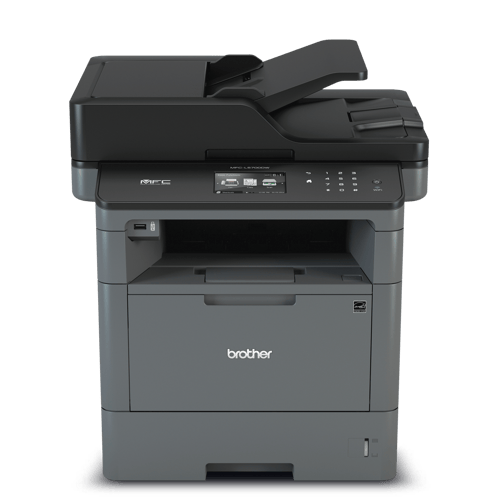
A full side-by-side comparison of reference models MFC-7840N and MFC-L5700DW within the same category.
Side-by-side specification comparison of two reference models
| Specification | MFC-7840N | MFC-L5700DW |
|---|---|---|
| Price | Not for sale | Not for sale |
| Connectivity | ||
| USB | Yes | Yes |
| Ethernet | Yes | Yes |
| Wi-Fi | — | Yes |
| Wi-Fi Direct | — | Yes |
| Mobile Printing | — | AirPrint, Google Cloud Print 2.0, Brother iPrint&Scan, Mopria, Cortado Workplace, Wi-Fi Direct |
| Apple AirPrint | — | Yes |
| Mopria | — | Yes |
| Security Features | — | Active Directory, Setting Lock, Secure Function Lock, Secure Print, Lock Slot, SSL/TLS, IPsec |
| Dimensions & Weight | ||
| Width | 428 mm | 434.3 mm |
| Depth | 396 mm | 426.7 mm |
| Height | 304 mm | 485.1 mm |
| Weight | 10 kg | 16.4 kg |
| Power & Warranty | ||
| Input Voltage | — | 120 V |
| Power Consumption Printing | — | 630 W |
| Power Consumption Sleep | — | 8.4 W |
| Warranty | — | 1-year limited warranty (U.S.) |
| Fax | ||
| Fax | Yes | Yes |
| Fax Modem Speed | 33.6 kbps | 33.6 kbps |
| Fax Resolution | 203 x 392 dpi | — |
| Fax Memory | 500 pages | 500 pages |
| General | ||
| Product Brand | Brother | Brother |
| Product Model | MFC-7840N | MFC-L5700DW |
| Product Series | — | MFC-L5000 Series |
| Product Type | Monochrome Laser Multifunction Printer | Monochrome Laser Multifunction Printer |
| Printer Functions | Print, Scan, Copy, Fax | Print, Scan, Copy, Fax |
| Print Technology | Laser | Laser |
| Consumables | ||
| Black Toner Model | TN-2110, TN-2120 | TN-820 / TN-850 |
| Included Black Toner Yield | 1000 pages | 2000 pages |
| Replacement Black Toner Yield | 2600 pages | 8000 pages |
| Drum Model | DR-2100 | DR-820 |
| Drum Yield | 12000 pages | 30000 pages |
| Paper & Printing | ||
| Maximum Paper Size | Legal | Legal |
| Supported Paper Sizes | A4, A5, A6, B5, B6, Executive, Legal, Letter, Envelopes | A4, A5, A6, B5, Letter, Legal, Executive, Folio |
| Minimum Custom Media Width | 69.9 mm | 76.2 mm |
| Maximum Custom Media Width | 215.9 mm | 215.9 mm |
| Minimum Custom Media Length | 116 mm | 127 mm |
| Maximum Custom Media Length | 406.4 mm | 355.6 mm |
| Supported Media Types | Plain, Recycled, Bond, Thick, Envelopes, Labels, Transparencies | Plain, Thin, Thick, Thicker, Recycled, Bond, Labels, Envelopes |
| Minimum Media Weight | 60 g/m² | 60 g/m² |
| Maximum Media Weight | 161 g/m² | 200 g/m² |
| Standard Input Capacity | 250 sheets | 300 sheets |
| Maximum Input Capacity | 250 sheets | 1340 sheets |
| Multipurpose Tray Capacity | 1 sheets | 50 sheets |
| Output Capacity | 100 sheets | 150 sheets |
| Automatic Duplex Printing | — | Yes |
| Scanning | ||
| Scanner Type | Flatbed + ADF | Flatbed + ADF |
| Optical Scan Resolution | 600 x 2400 dpi | 1200 x 1200 dpi |
| Black Scan Speed | — | 28 ipm |
| Color Scan Speed | — | 20 ipm |
| ADF Capacity | 35 sheets | 50 sheets |
| Print Performance | ||
| Black Print Speed A4 | 22 ppm | 42 ppm |
| First Page Out Black | — | 7.5 s |
| Print Resolution | 2400 x 600 dpi | 1200 x 1200 dpi |
| Monthly Duty Cycle | — | 50000 pages/month |
| Recommended Monthly Volume | — | Up to 3500 pages/month |
| Processor Speed | — | 800 MHz |
| Standard Memory | 32 MB | 256 MB |
| Maximum Memory | 32 MB | — |
| Print Languages | PCL 6, BR-Script 3 | PCL 6, BR-Script 3, PDF, XPS |
| Copying | ||
| Black Copy Speed | 22 cpm | 42 cpm |
| Copy Resolution | 600 x 600 dpi | 1200 x 600 dpi |
| Maximum Copies | 99 copies | 99 copies |
| Copy Zoom Range | 25-400 % | 25-400 % |
MFC-7840N and MFC-L5700DW share specifications such as Printer Functions (Print, Scan, Copy, Fax), Print Technology (Laser), USB (Yes), Ethernet (Yes).
The main differences: Black Print Speed A4 (MFC-7840N: 22 ppm, MFC-L5700DW: 42 ppm); Print Resolution (MFC-7840N: 2400 x 600 dpi, MFC-L5700DW: 1200 x 1200 dpi); Automatic Duplex Printing (MFC-7840N: —, MFC-L5700DW: Yes).
MFC-7840N may suit users who need its differing values, while MFC-L5700DW benefits those who need its paired strengths. Review the specs table above before deciding.