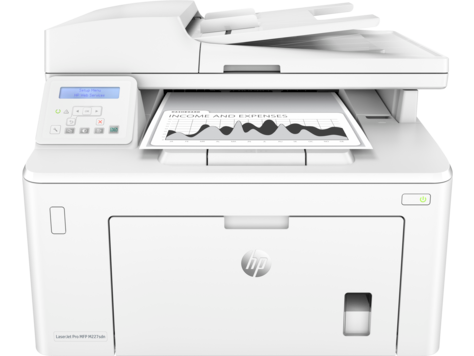
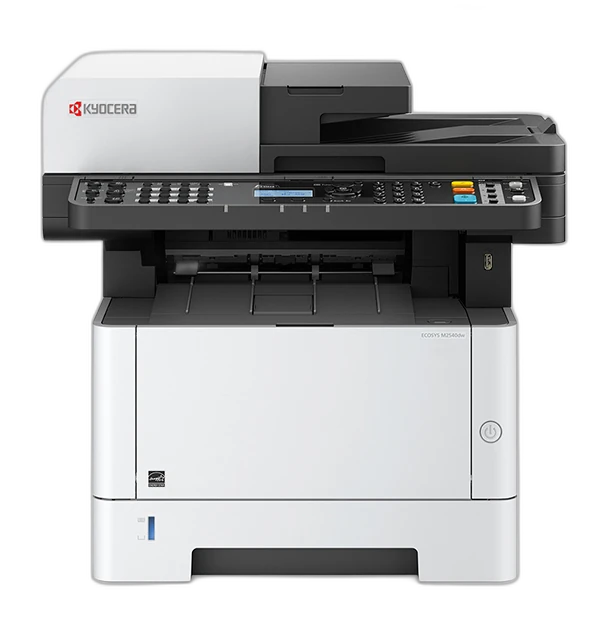
Choose LaserJet Pro MFP M227fdn if you need:
- Higher Fax Memory: 1000 pages
- Higher Minimum Custom Media Width: 76.2 mm vs 70 mm
- Higher Black Duplex Print Speed: 18 ipm
- Recommended Monthly Volume: 250-2500 pages/month
printpedia
Side-by-side specification comparison of two reference models
A full side-by-side comparison of reference models LaserJet Pro MFP M227fdn and ECOSYS M2640idw within the same category.
Side-by-side specification comparison of two reference models
| Specification | LaserJet Pro MFP M227fdn | ECOSYS M2640idw |
|---|---|---|
| Price | Not for sale | Not for sale |
| Connectivity | ||
| USB | Yes | Yes |
| Ethernet | Yes | Yes |
| Wi-Fi | — | Yes |
| Wi-Fi Direct | — | Yes |
| Mobile Printing | HP ePrint, Apple AirPrint, Mopria, Google Cloud Print, HP Smart | KYOCERA Mobile Print, Apple AirPrint, Mopria |
| Apple AirPrint | Yes | Yes |
| Mopria | Yes | Yes |
| Security Features | Password-protected Embedded Web Server, network-port control, SNMP community security, 802.1X | IPsec, SNMPv3, IEEE 802.1X, SSL/TLS |
| Dimensions & Weight | ||
| Width | 403.9 mm | 417 mm |
| Depth | 406.4 mm | 412 mm |
| Height | 312.4 mm | 437 mm |
| Weight | 9.4 kg | 19 kg |
| Power & Warranty | ||
| Input Voltage | 110-127 V | 120 V, 60 Hz (US configuration) V |
| Power Consumption Printing | 475 W | 681 W |
| Power Consumption Sleep | 1 W | 1 W |
| Warranty | 1-year limited hardware warranty (U.S.) | 1-year standard manufacturer warranty; long-life components up to 3 years/100,000 pages (regional terms) |
| Fax | ||
| Fax | Yes | Yes |
| Fax Modem Speed | 33.6 kbps | 33.6 kbps |
| Fax Resolution | 300 x 300 dpi | 200 x 100, 200 x 200, 200 x 400, 400 x 400 dpi |
| Fax Memory | 1000 pages | — |
| General | ||
| Product Brand | HP | Kyocera |
| Product Model | LaserJet Pro MFP M227fdn | ECOSYS M2640idw |
| Product Series | LaserJet Pro MFP M227 Series | ECOSYS M2640 Family |
| Product Type | Monochrome Laser Multifunction Printer | Monochrome Laser Multifunction Printer |
| Printer Functions | Print, Scan, Copy, Fax | Print, copy, color scan, fax |
| Print Technology | Laser | Kyocera ECOSYS laser |
| Consumables | ||
| Black Toner Model | HP 30A / 30X (CF230A / CF230X) | TK-1172 |
| Included Black Toner Yield | 1600 pages | 3600 pages |
| Replacement Black Toner Yield | 3500 pages | 7200 pages |
| Drum Model | HP 32A (CF232A) | DK-1150 |
| Drum Yield | 23000 pages | 100000 pages |
| Paper & Printing | ||
| Maximum Paper Size | Legal | Legal |
| Supported Paper Sizes | Letter, Legal, Executive, 8.5 x 13 in, A4, A5, A6, B5 (JIS), Envelope C5, Envelope DL | A4, A5, A6, B5, B6, Letter, Legal, custom sizes |
| Minimum Custom Media Width | 76.2 mm | 70 mm |
| Maximum Custom Media Width | 215.9 mm | 216 mm |
| Minimum Custom Media Length | 127 mm | 148 mm |
| Maximum Custom Media Length | 355.6 mm | 356 mm |
| Supported Media Types | Laser paper, Plain paper, Photo paper, Rough paper, Vellum, Envelope, Label, Cardstock, Postcard | Plain, recycled, preprinted, bond, color, prepunched, letterhead, envelopes, labels, thick paper |
| Minimum Media Weight | 60 g/m² | 60 g/m² |
| Maximum Media Weight | 163 g/m² | 220 g/m² |
| Standard Input Capacity | 260 sheets | 350 sheets |
| Maximum Input Capacity | 260 sheets | 850 sheets |
| Multipurpose Tray Capacity | 10 sheets | 100 sheets |
| Output Capacity | 150 sheets | 150 sheets |
| Automatic Duplex Printing | Yes | Yes |
| Scanning | ||
| Scanner Type | Flatbed + ADF | Flatbed scanner with 50-sheet automatic document feeder |
| Optical Scan Resolution | 1200 x 1200 dpi | 600 x 600 dpi |
| Black Scan Speed | 15 ipm | 40 ipm |
| Color Scan Speed | 8 ipm | 23 ipm |
| Duplex Scanning | — | Yes |
| ADF Capacity | 35 sheets | 50 sheets |
| Print Performance | ||
| Black Print Speed A4 | 28 ppm | 42 ppm |
| Black Duplex Print Speed | 18 ipm | — |
| First Page Out Black | 6.4 s | 6.4 s |
| Print Resolution | 600 x 600 dpi | 600 x 600; up to Fine 1200 dpi |
| Monthly Duty Cycle | 30000 pages/month | 50000 pages/month |
| Recommended Monthly Volume | 250-2500 pages/month | — |
| Warm-up Time | — | 20 s |
| Processor Speed | 800 MHz | 800 MHz |
| Standard Memory | 256 MB | 512 MB |
| Maximum Memory | 256 MB | 1536 MB |
| Internal Storage | 0 GB | — |
| Print Languages | PCL 5c, PCL 6, PostScript 3, PCLm, PDF, URF, PWG | PRESCRIBE IIc, PCL 6 (PCL 5e/PCL-XL), KPDL 3 (PostScript 3), PDF Direct Print, XPS/OpenXPS |
| Copying | ||
| Black Copy Speed | 28 cpm | 42 cpm |
| Copy Resolution | 600 x 600 dpi | 600 x 600 dpi |
| Maximum Copies | 99 copies | 999 copies |
| Copy Zoom Range | 25-400 % | 25-400% |
LaserJet Pro MFP M227fdn and ECOSYS M2640idw share specifications such as Automatic Duplex Printing (Yes), USB (Yes), Ethernet (Yes), Apple AirPrint (Yes).
The main differences: Printer Functions (LaserJet Pro MFP M227fdn: Print, Scan, Copy, Fax, ECOSYS M2640idw: Print, copy, color scan, fax); Print Technology (LaserJet Pro MFP M227fdn: Laser, ECOSYS M2640idw: Kyocera ECOSYS laser); Black Print Speed A4 (LaserJet Pro MFP M227fdn: 28 ppm, ECOSYS M2640idw: 42 ppm); Print Resolution (LaserJet Pro MFP M227fdn: 600 x 600 dpi, ECOSYS M2640idw: 600 x 600; up to Fine 1200 dpi).
LaserJet Pro MFP M227fdn may suit users who need its differing values, while ECOSYS M2640idw benefits those who need its paired strengths. Review the specs table above before deciding.