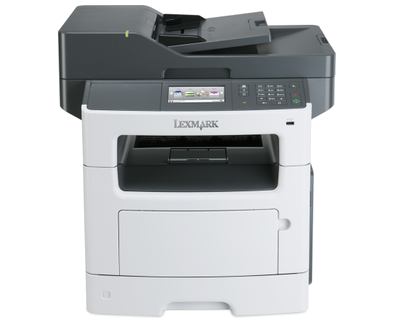
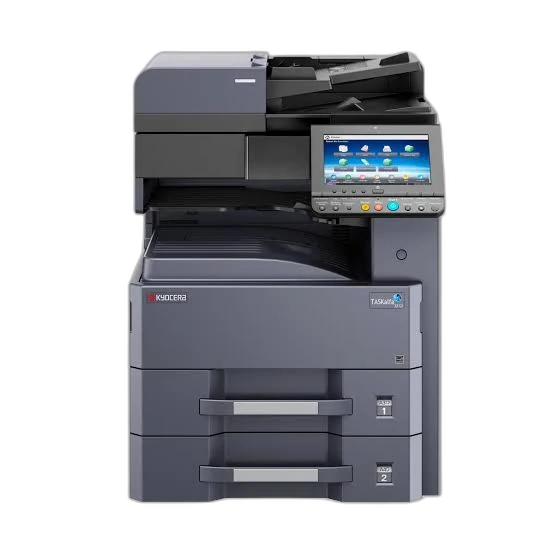
Choose MX617de if you need:
- Higher Width: 489 mm vs 417 mm
- Higher Depth: 479 mm vs 412 mm
- Higher Height: 561 mm vs 437 mm
- Higher Weight: 23.6 kg vs 19 kg
printpedia
Side-by-side specification comparison of two reference models
A full side-by-side comparison of reference models MX617de and ECOSYS M2040dn within the same category.
Side-by-side specification comparison of two reference models
| Specification | MX617de | ECOSYS M2040dn |
|---|---|---|
| Price | Not for sale | Not for sale |
| Connectivity | ||
| USB | Yes | Yes |
| Ethernet | Yes | Yes |
| Mobile Printing | Lexmark Mobile Print, Apple AirPrint, Mopria | KYOCERA Mobile Print, Apple AirPrint, Mopria |
| Apple AirPrint | Yes | Yes |
| Mopria | Yes | Yes |
| Security Features | IPSec, SNMPv3, IEEE 802.1X authentication | IPsec, SNMPv3, IEEE 802.1X, SSL/TLS |
| Dimensions & Weight | ||
| Width | 489 mm | 417 mm |
| Depth | 479 mm | 412 mm |
| Height | 561 mm | 437 mm |
| Weight | 23.6 kg | 19 kg |
| Power & Warranty | ||
| Input Voltage | 100-127 V / 220-240 V, 50/60 Hz (regional variants) V | 220-240 V, 50/60 Hz V |
| Power Consumption Printing | 640 W | 661 W |
| Power Consumption Sleep | 3.3 W | 1 W |
| Warranty | 4-year guarantee upon registration (UK configuration) | 1-year standard manufacturer warranty; long-life components up to 3 years/100,000 pages (regional terms) |
| Fax | ||
| Fax | Yes | — |
| Fax Modem Speed | 33.6 kbps | — |
| Fax Resolution | Up to 300 x 300 dpi | — |
| General | ||
| Product Brand | Lexmark | Kyocera |
| Product Model | MX617de | ECOSYS M2040dn |
| Product Series | Lexmark MX610 Series | ECOSYS M2040/M2540 Family |
| Product Type | Monochrome Laser Multifunction Printer | Monochrome Laser Multifunction Printer |
| Printer Functions | Print, copy, color scan, network scan, fax | Print, copy, color scan |
| Print Technology | Laser | Kyocera ECOSYS laser |
| Consumables | ||
| Black Toner Model | 51B2X00 / 51B2H00 / 51B2000 | TK-1170 |
| Included Black Toner Yield | 5000 pages | 3600 pages |
| Replacement Black Toner Yield | 20000 pages | 7200 pages |
| Drum Model | 50F0Z00 / 50F0ZA0 | DK-1150 |
| Drum Yield | 60000 pages | 100000 pages |
| Paper & Printing | ||
| Maximum Paper Size | Legal | Legal |
| Supported Paper Sizes | A4, A5, A6, JIS B5, Letter, Legal, Executive, Statement, Oficio, Folio, Universal, envelopes | A4, A5, A6, B5, B6, Letter, Legal, custom sizes |
| Minimum Custom Media Width | — | 70 mm |
| Maximum Custom Media Width | — | 216 mm |
| Minimum Custom Media Length | — | 148 mm |
| Maximum Custom Media Length | — | 356 mm |
| Supported Media Types | Paper labels, card stock, plain paper, transparencies, envelopes | Plain, recycled, preprinted, bond, color, prepunched, letterhead, envelopes, labels, thick paper |
| Minimum Media Weight | 60 g/m² | 60 g/m² |
| Maximum Media Weight | 120 g/m² | 220 g/m² |
| Standard Input Capacity | 650 sheets | 350 sheets |
| Maximum Input Capacity | 2300 sheets | 850 sheets |
| Multipurpose Tray Capacity | 100 sheets | 100 sheets |
| Output Capacity | 250 sheets | 150 sheets |
| Automatic Duplex Printing | Yes | Yes |
| Scanning | ||
| Scanner Type | Flatbed scanner with 50-sheet reversing ADF | Flatbed scanner with 50-sheet automatic document feeder |
| Optical Scan Resolution | 1200 x 600 black; 600 x 600 color dpi | 600 x 600 dpi |
| Black Scan Speed | 45 ipm | 40 ipm |
| Color Scan Speed | 30 ipm | 23 ipm |
| Duplex Scanning | Yes | Yes |
| ADF Capacity | 50 sheets | 50 sheets |
| Print Performance | ||
| Black Print Speed A4 | 47 ppm | 40 ppm |
| Black Duplex Print Speed | 20 ipm | — |
| First Page Out Black | 6.5 s | 6.4 s |
| Print Resolution | 1200 x 1200; 2400 IQ (2400 x 600); 600 x 600; 1200 IQ (1200 x 600) dpi | 1200 x 1200 dpi |
| Monthly Duty Cycle | 175000 pages/month | 50000 pages/month |
| Recommended Monthly Volume | 2,000-15,000 pages/month | — |
| Warm-up Time | — | 17 s |
| Processor Speed | 800 MHz | 800 MHz |
| Standard Memory | 1024 MB | 512 MB |
| Maximum Memory | 3072 MB | 1536 MB |
| Print Languages | PCL 5e, PCL 6, Microsoft XPS, PPDS, PostScript 3, PDF 1.7, Direct Image | PRESCRIBE IIc, PCL 6 (PCL 5e/PCL-XL), KPDL 3 (PostScript 3), PDF Direct Print, XPS/OpenXPS |
| Copying | ||
| Black Copy Speed | 47 cpm | 40 cpm |
| Copy Resolution | 600 x 600 dpi | 600 x 600 dpi |
| Maximum Copies | 999 copies | 999 copies |
| Copy Zoom Range | 25-400% | 25-400% |
MX617de and ECOSYS M2040dn share specifications such as Automatic Duplex Printing (Yes), USB (Yes), Ethernet (Yes), Apple AirPrint (Yes).
The main differences: Printer Functions (MX617de: Print, copy, color scan, network scan, fax, ECOSYS M2040dn: Print, copy, color scan); Print Technology (MX617de: Laser, ECOSYS M2040dn: Kyocera ECOSYS laser); Black Print Speed A4 (MX617de: 47 ppm, ECOSYS M2040dn: 40 ppm); Print Resolution (MX617de: 1200 x 1200; 2400 IQ (2400 x 600); 600 x 600; 1200 IQ (1200 x 600) dpi, ECOSYS M2040dn: 1200 x 1200 dpi).
MX617de may suit users who need its differing values, while ECOSYS M2040dn benefits those who need its paired strengths. Review the specs table above before deciding.